Retusagi Google Slide Template for Visual Storytelling
What Makes the Retusagi Template Stand Out
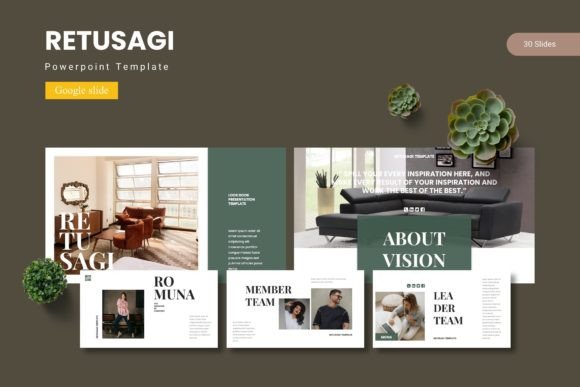
Presentations are no longer just about bullet points and static slides. The Retusagi - Google Slide Template offers a complete ecosystem for building presentations that feel curated rather than assembled. With 150 total slides spread across five premade color variations and 30 slides per template section, this template gives you room to tell a story without running out of layout options. Break slides help you signal topic shifts, while infographic slides built on master slides allow you to present data clearly. Every graphic is resizable and editable, and the picture placeholders work with a simple drag-and-drop action. Whether you are a designer, a small business owner, or a content creator, this template provides a foundation that balances structure with flexibility.
What makes the Retusagi template particularly useful is that it ships with five complete color schemes. You are not locked into a single look. You can switch between color variations to match a brand palette, a campaign theme, or a personal style preference. The inclusion of gallery and portfolio slides also means that visual-heavy presentations—like photography portfolios, product showcases, or case study decks—do not require extra work to look polished. The template includes both PPTX files and Google Slides files, with 30 slides per color scheme, giving you 150 ready-to-use slides out of the box.
Presentations That Feel Like Narratives
A common challenge when building a deck is keeping the audience engaged from start to finish. The Retusagi template addresses this with section break slides that act as visual breathing points. You can use these breaks to introduce a new chapter, pivot to a different topic, or mark a transition in your story. For example, a marketing consultant presenting a quarterly strategy review could use a break slide after the performance summary to signal the shift toward upcoming initiatives. This simple technique helps the audience follow your logic without feeling overwhelmed by continuous content.
Infographic Slides for Data-Driven Stories
Numbers and statistics often feel dry in a presentation. The handcrafted infographic slides in this template turn data into visuals that support your narrative. Instead of dropping a table onto a slide, you can use the infographic layouts to highlight key figures, show comparisons, or illustrate trends. A freelancer pitching their services could use an infographic slide to display metrics like client retention rates, project turnaround times, or revenue growth. Because the infographics are built on master slides, you maintain consistency across the entire deck without manually aligning elements every time.
Portfolio and Gallery Slides for Visual Work
If you work in a visually driven field—photography, design, architecture, or fashion—you need slides that let your work speak. The gallery and portfolio slides in the Retusagi template remove the friction of arranging images manually. You simply use the picture placeholders to drop in your visuals, and the layout handles the spacing and alignment. A wedding photographer could build a client gallery that flows naturally from ceremony shots to reception highlights. An illustrator could group portfolio pieces by style or project type, letting the slide design frame the work without competing with it.
For Marketers and Entrepreneurs
Marketers often need to create decks for different audiences—investors, clients, internal teams—and each audience expects a slightly different tone. The five color variations in Retusagi make this practical without building a new deck from scratch. You could use the muted, professional color scheme for a boardroom presentation and switch to a brighter palette for a social media pitch deck. This adaptability saves time and ensures that your content remains consistent even when the visual tone shifts. Additionally, the infographic slides are ideal for presenting campaign results, market analysis, or ROI breakdowns in a format that stakeholders can absorb quickly.
For Educators and Trainers
Presenting educational content requires clarity above all. The Retusagi template offers clean layouts that reduce cognitive load. Section break slides work well for separating modules or units, while the infographic slides can simplify complex concepts like a process workflow or a timeline of historical events. An educator teaching a course on digital marketing could use the template to structure each lesson: an introductory slide, a break to start the main content, infographics for key models (like the marketing funnel), and a portfolio slide to showcase student projects. The consistent layout helps learners focus on the material rather than getting distracted by inconsistent visuals.
For Freelancers and Small Business Owners
When you run your own business, your presentation deck often doubles as a portfolio and a proposal. The gallery slides let you showcase past work, while the editable infographics allow you to present client results or case studies. A freelance web designer could include screenshots of completed websites using the portfolio slides, then use an infographic to show improvements in site traffic or load speed after a redesign. The resume or about-me slides can be customized to reflect your personal brand, and the five color variations give you the freedom to align the deck with your website or social media aesthetic. This coherence builds trust with potential clients.
For Bloggers and Content Creators
Content creators often repurpose their work across platforms. A blog post can become a slide deck for YouTube, a webinar, or a lead magnet. The Retusagi template makes this repurposing smooth because the slide layouts are designed for readability on screen. You can use the text-heavy slides for content that requires explanation and the image-heavy slides for visual examples. A travel blogger, for instance, could create a deck that summarizes a destination guide: section breaks for each category (food, accommodation, attractions), infographics for budget breakdowns, and gallery slides for personal photos. The result is a presentation that feels both informative and personal.
Keep Your Slides Focused on One Idea Each
Even with a template that offers 150 slides, the goal is not to fill every one of them. A strong presentation uses one slide to communicate one idea. The Retusagi template supports this by providing clear hierarchies on each slide. Use the title area for the main point and the body for supporting details. If you feel tempted to cram multiple points onto a single slide, consider using a section break or a dedicated infographic slide to give each idea its own space. This approach keeps the audience engaged and makes your message easier to remember.
Take Advantage of the Picture Placeholders
The picture placeholders in the template are designed for drag-and-drop use. Instead of spending time adjusting image sizes and positions, you can focus on selecting the right visuals. Choose images that support your narrative rather than simply decorating a slide. A picture of a team collaborating works better for a slide about company culture than a generic stock photo of a handshake. The placeholder shape also ensures that your images maintain a consistent aspect ratio across the entire deck, which creates a polished look without extra effort.
Use the Five Color Variations Strategically
The five premade color schemes give you a shortcut to a cohesive deck, but you can also use them to test different moods. If you are unsure which palette works best for your audience, create a few test slides using different color variations and gather feedback. A conservative client may prefer a neutral scheme, while a creative audience may respond better to a bold accent palette. The template allows you to apply the color variation across all slides at once, so experimenting does not require rebuilding the deck.
Maintain Consistency with Master Slides
One of the strongest features of the Retusagi template is its reliance on master slides. This means that changes you make to the master slide—such as adjusting a font, changing a background element, or updating a logo position—apply automatically to all slides that use that layout. If you decide to switch the body font from a sans-serif to a serif halfway through building your deck, the master slide update saves you from manually editing each slide. This consistency is especially important when collaborating with a team, because it ensures that every contributor produces slides that look like they belong to the same presentation.
Balancing Creativity with Structure
Templates exist to remove friction, not to limit creativity. The Retusagi - Google Slide Template gives you a solid structure so you can focus on your message, your visuals, and your storytelling. The 150 slides across five color variations provide enough range to cover most presentation scenarios, from data-heavy reports to visual portfolios. The infographic slides, break slides, and gallery layouts are tools you can adapt to your specific needs. Whether you are a marketer building a pitch, an educator planning a lesson, or a freelancer showcasing your work, this template lets you spend less time formatting and more time creating content that resonates with your audience.
The best presentations feel effortless. With the right template, you can achieve that effect without spending hours on layout adjustments. The Retusagi template is designed to support that goal, giving you a system that is both flexible and easy to use. By making small, intentional choices—like using a section break to pace your narrative or selecting a color scheme that matches your brand—you can create presentations that stand out while staying clear and organized.