Master Modern Presentations with Luiza – A Complete Google Slide Template for Every Need
Presentations are everywhere. Whether you are pitching a business idea, teaching a class, sharing a portfolio, or reporting quarterly results, the way you present your content can make or break your message. A well-structured presentation does not just deliver information—it tells a story, holds attention, and builds credibility. Yet many people struggle with design, layout, and consistency. That is where a high-quality Google Slide template like Luiza comes in. It offers a ready-made framework that combines aesthetics with function, allowing you to focus on your content while looking professional at every slide.
In this article, we will explore what makes the Luiza Google Slide Template a powerful tool, how it fits into modern work and education, and why using a structured template can elevate your presentations from ordinary to memorable. Whether you are a beginner or a seasoned presenter, understanding the value of a well-crafted template will change how you approach your next slide deck.
Why Google Slides Templates Matter in Today’s World
In the past, creating a presentation meant starting from a blank canvas, choosing fonts, aligning shapes, and spending hours on design tweaks. For many, this process was frustrating and time-consuming. Today, with the rise of remote work, online education, and digital collaboration, the demand for efficient yet visually appealing presentations has skyrocketed. Google Slides has become a go-to platform because it is cloud-based, collaborative, and free. But even with a great platform, the design gap remains.
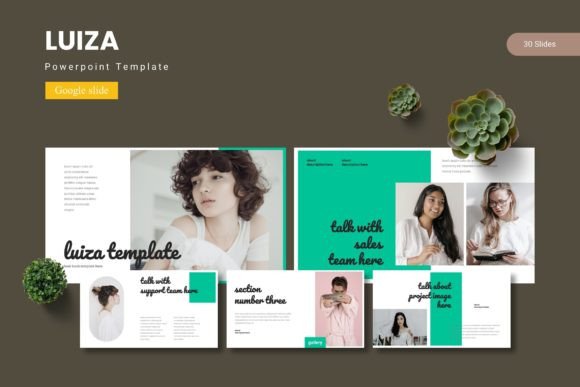
A Google Slide template bridges that gap. It provides pre-designed slides with coordinated colors, fonts, and layouts. You simply add your content—text, images, data—and the template does the heavy lifting for visual consistency. The Luiza template, in particular, goes a step further. It offers 150 total slides across 5 pre-made color schemes, giving you flexibility without sacrificing coherence. Instead of reinventing the wheel every time you open a new presentation, you get a professional starting point that you can adapt in seconds.
This shift is significant for several reasons. First, it saves time—hours that you can redirect to refining your message, practicing your delivery, or analyzing your data. Second, it ensures a polished look even if you have no design background. Third, it supports brand consistency for businesses and educators who need to present regularly. In short, templates democratize good design.
What Makes the Luiza Google Slide Template Unique?
Not all templates are created equal. Some offer only a handful of slides, forcing you to duplicate and improvise. Others are rigid, making customization difficult. The Luiza template is built with depth and flexibility in mind. Let us break down its key features and understand why they matter.
150 Slides Across 5 Premade Colors
With 150 total slides, Luiza covers nearly every presentation scenario you can imagine. Each of the 5 color variations contains 30 slides, meaning you get a complete deck in each color theme. This is not just about quantity—it is about having the right slide for the right moment. Need a section break? There is a dedicated slide for that. Want to showcase a portfolio or gallery? There is a drag-and-drop placeholder ready. Need an infographic? The template includes handcrafted infographics that illustrate data clearly.
The five color schemes allow you to match the template to your brand, project, or personal taste. Whether you prefer a calm blue palette, a bold red tone, or a neutral gray, you have options. This variety reduces the temptation to reuse the same look for every presentation, keeping your work fresh and context-appropriate.
Handcrafted Infographics and Pixel-Perfect Illustrations
Data visualization is one of the most effective ways to communicate complex information. However, creating infographics from scratch is time-consuming and often ends up looking cluttered. Luiza includes handcrafted infographics that are both attractive and easy to edit. You can replace placeholder data with your own numbers, adjust colors, and resize elements without breaking the layout.
Additionally, the template features pixel-perfect illustrations that maintain clarity on any screen. Every graphic is resizable and editable, so you are never stuck with an image that does not fit your message. This level of polish is what separates a professional presentation from a hastily assembled one.
Master Slides and Picture Placeholders
One of the most practical features of Luiza is its use of master slides. In Google Slides, master slides control the global design of your presentation. By editing a master slide, you can change the font, color, or layout across all slides at once. This is a huge time-saver and ensures consistency. The Luiza template comes with master slides already set up, so you can modify the entire deck in just a few clicks.
Picture placeholders are another thoughtful addition. Instead of manually cropping and positioning images, you simply drag and drop your photos into pre-sized frames. The template automatically fits them into the layout. This feature is especially valuable for gallery and portfolio slides, where image placement and sizing can make or break the visual impact.
File Inclusions and Compatibility
When you download the Luiza template, you receive a folder containing all necessary files. The package includes 5 PPTX files (one for each color scheme) and the corresponding Google Slides versions. Additionally, you get a Readme First document with instructions, font information, and photo credits. This ensures that even if you are new to using templates, you have guidance every step of the way. The template is designed to work seamlessly within Google Slides, but the PPTX files also allow you to use it in Microsoft PowerPoint if needed.
Practical Applications: Where Luiza Shines
The Luiza template is versatile enough to serve a wide range of use cases. Here are a few scenarios where its features truly come to life.
Business Pitches and Investor Decks
When you are presenting to investors or clients, every detail matters. Your slides need to communicate professionalism, clarity, and confidence. The Luiza template provides clean layouts for executive summaries, market analysis, financial projections, and team introductions. The infographic slides are perfect for illustrating growth metrics or competitive landscapes. With the five color variations, you can choose a scheme that aligns with your company branding or the tone of the pitch.
Moreover, the section break slides help you structure your narrative. Instead of jumping abruptly from one topic to the next, you can insert a visually distinct transition slide that signals a change in focus. This might seem small, but it greatly improves the flow of your presentation and helps your audience follow along.
Educational Lectures and Workshops
Teachers and trainers often need to present dense information in an accessible way. The Luiza template supports this with slides designed for bullet points, diagrams, quotes, and image-heavy content. You can use the gallery slides to showcase student work, the infographics to explain processes, and the clean text slides to present key concepts. Because the template is based on master slides, you can quickly adjust the font size or color to improve readability for your audience.
Another advantage is the ability to collaborate in real time. Since the template works in Google Slides, multiple educators can work on the same deck simultaneously. This is ideal for team-taught courses or workshops where several facilitators contribute content.
Creative Portfolios and Personal Branding
If you are a designer, photographer, artist, or freelancer, your portfolio is often your most important marketing tool. The Luiza template includes dedicated portfolio and gallery slides that let you present your work in a clean, visually appealing way. The picture placeholders ensure that your images are displayed consistently, and the editable graphics allow you to add your own style accents.
Because you have five color schemes to choose from, you can tailor your portfolio to different clients or contexts. A neutral scheme might suit a corporate client, while a bold color could reflect your creative personality. This flexibility helps you present yourself in the best light without starting from scratch each time.
Internal Team Reports and Company Updates
For weekly updates, quarterly reviews, or all-hands meetings, the Luiza template provides a professional yet approachable look. The 30 slides per color give you room to cover agendas, achievements, challenges, next steps, and acknowledgments. The consistency of the design reinforces your organization’s identity and makes the information easy to digest. Plus, because the template is editable, you can reuse it week after week, updating only the content.
Common Misunderstandings About Using Templates
Some people worry that using a template makes their presentation look generic or uninspired. This is a valid concern, but only if you treat the template as a final product rather than a starting point. The Luiza template is designed to be customizable. You can swap out colors, replace graphics, adjust layouts, and add your own branding. The template provides a strong foundation, but your content and personal touches are what make it unique.
Another misunderstanding is that templates are only for people who lack design skills. In reality, even professional designers use templates to save time and maintain consistency. A well-built template like Luiza includes elements (master slides, picture placeholders, coordinated infographics) that would take hours to create from scratch. Using a template is not a shortcut—it is a smart workflow choice that frees you to focus on higher-level tasks.
Finally, some users worry that templates are difficult to implement in Google Slides. However, modern templates come with clear instructions. Luiza includes a Readme First file that guides you through installation, font usage, and customization. You do not need any technical expertise. If you can drag and drop, type text, and change colors, you can use this template effectively.
Practical Tips for Getting the Most Out of Luiza
To truly maximize the value of this template, consider the following approaches:
- Start with the readme – Before diving in, read the instructions. They explain how to access the fonts, where to find the different color schemes, and how to use the master slides.
- Choose your color scheme early – Pick the color variation that best matches your content and brand. You can always tweak individual slides later, but starting with a coherent palette saves time.
- Customize the master slides – Want a different font or background color? Edit the master slide, and the change will apply across the entire deck. This is one of the most powerful features of Google Slides templates.
- Use the picture placeholders – Instead of inserting images manually, drag your photos into the placeholders. This ensures consistent sizing and alignment across all slides.
- Mix and match slides from different color schemes – While each color scheme is self-contained, you are not locked in. If you love the infographics from one scheme and the gallery layout from another, you can copy slides between files.
- Adapt the infographics to your data – Replace the sample numbers in the infographics with your own data. Adjust colors to maintain contrast and readability. The templates are fully editable, so you can make them work for you.
How the Luiza Template Fits into Modern Workflows
In 2025, collaboration and speed are more important than ever. Teams work across time zones, tools, and platforms. A Google Slides template that lives in the cloud allows everyone to access the same design assets, make edits, and leave comments in real time. The Luiza template supports this collaborative workflow natively. You can share the deck with colleagues, assign slides, and track changes—all without leaving Google Slides.
This is especially valuable for remote and hybrid teams. Instead of emailing PPTX files back and forth, you maintain a single source of truth. The template’s consistency ensures that no matter who adds a slide, it looks like it belongs. This cohesion builds trust with your audience and reinforces your brand identity.
For educators, the cloud-based nature means students can access presentation materials, contribute to group projects, and learn by example. The template becomes not just a tool for delivery, but a resource for teaching design principles, narrative structure, and visual communication.
Final Thoughts: Why Luiza Deserves a Place in Your Toolkit
The Luiza Google Slide Template is more than a collection of slides—it is a system for creating presentations that are clear, consistent, and compelling. With 150 slides across 5 color variations, handcrafted infographics, pixel-perfect illustrations, master slides, and drag-and-drop picture placeholders, it covers almost every presentation need you can imagine. Whether you are pitching to investors, teaching a class, building a portfolio, or updating your team, Luiza gives you a professional foundation that saves time and elevates your message.
If you have been struggling with presentation design or simply want to streamline your workflow, consider adopting a template like Luiza. It is an investment in quality, consistency, and efficiency. The next time you open Google Slides to create a new deck, imagine starting with 30 perfectly designed slides, a color scheme that fits your brand, and infographics that make your data shine. That is the experience Luiza delivers—and it can transform the way you present.
So go ahead, explore the Luiza template, customize it to your heart’s content, and see how much easier and more enjoyable presentation creation can be. Your audience will notice the difference, and you will never want to start from a blank slide again.