Velgo PowerPoint Template: Create Presentations That Resonate
Presentations are a core part of how ideas travel in the modern world. Whether you are pitching to investors, teaching a class, sharing a campaign strategy, or presenting quarterly results, the quality of your slides can significantly influence how your message is received. The Velgo PowerPoint Template aims to remove the friction between your ideas and their visual expression. Instead of wrestling with design details, you can focus on content while the template handles the aesthetics.
This article explores what Velgo offers, where it excels, and how you can use it to communicate with clarity and confidence.
What Makes Velgo Stand Out?
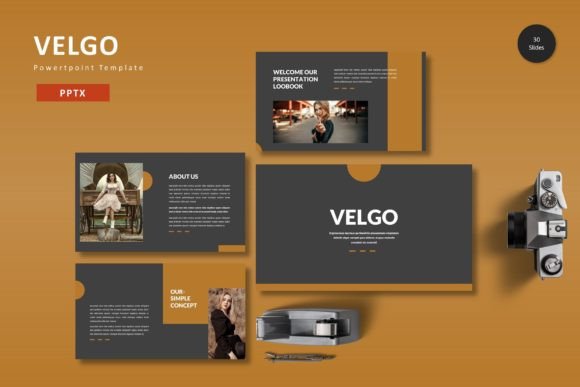
Velgo is a presentation template built for PowerPoint that prioritizes structure and flexibility. With 150 total slides organized across five pre-made color schemes, it gives you a substantial library of layouts without overwhelming you with decision fatigue. Each color variation includes 30 slides, so you can maintain visual consistency throughout a full presentation.
The template relies on master slides, which means you can make global changes to fonts, colors, or backgrounds in seconds. This is a practical feature for anyone who needs to align slides with brand guidelines or adapt a presentation for a new audience. If you have ever updated slides one by one to match a new color palette, you know how much time this saves.
Handcrafted Infographics and Pixel-Perfect Illustrations
Data visualization is one of the strongest ways to make an argument stick. Velgo includes handcrafted infographics that are already styled to match the rest of the template. You do not need to build charts from scratch or search for icons that clash with your slide design. The graphics are pixel-perfect, meaning they scale cleanly across screens and projectors.
Because all graphics are resizable and editable, you can adjust them to fit your specific numbers or narrative. This is a notable advantage over static images that cannot be modified. If your data changes, you simply update the graphic rather than rebuilding it.
Picture Placeholder and Drag-Drop Simplicity
One of the more tedious aspects of presentation creation is inserting and formatting images. Velgo uses picture placeholders that allow you to drag and drop your photos into predefined frames. The image automatically adjusts to fit the layout, which eliminates the need to crop or resize manually. This feature is especially useful for portfolios, gallery slides, and team introductions where multiple images need to be placed consistently.
The template also includes dedicated gallery and portfolio slides, making it a strong choice for creative professionals who need to showcase visual work.
Practical Applications Across Different Environments
Velgo is designed to be versatile, and its structure supports a wide range of use cases. Here are a few realistic scenarios where it performs well.
Professional Settings: Pitches, Reports, and Internal Updates
If you are presenting a business plan or a quarterly review, your slides need to communicate data clearly and inspire confidence. Velgo’s infographic layouts and clean color schemes help you present numbers without clutter. You can use the section break slides to transition between topics, which gives your audience a natural pause point and helps them follow your narrative.
For consultants and agency professionals, the customizable layouts mean you can adapt the same template for different clients. Change the color scheme to match a client’s brand, update the content, and you have a tailored presentation in less time than starting from zero.
Educational and Training Contexts
Teachers, trainers, and educators often need presentations that balance text, visuals, and data. Velgo’s 30 slides per color scheme provide enough variety to cover lecture content, case studies, and discussion prompts without looking repetitive. The master slide structure also makes it easy to add your own school or institution logo across all slides.
Because the template is based on PowerPoint, it works across devices and versions, which is helpful when you are sharing files with students or colleagues who may not have the latest software.
Creative and Commercial Portfolios
Photographers, designers, and artists can use Velgo to create portfolio presentations that feel polished. The gallery and portfolio slides are built to highlight images prominently. The drag-drop picture placeholders reduce the time spent on formatting, so you can focus on selecting and sequencing your best work.
If you are a freelancer pitching to a potential client, a well-designed portfolio deck can set you apart. Velgo gives you a professional foundation without requiring advanced design skills.
Marketing and Campaign Presentations
Marketers often need to present campaign strategies, performance data, and creative concepts in one cohesive deck. Velgo’s infographics and resizable graphics allow you to show metrics like engagement rates, conversion funnels, or audience growth in a visually compelling way. The five color variations mean you can choose a palette that aligns with the campaign’s tone, whether that is bold and energetic or calm and professional.
Usability, Efficiency, and Real-World Benefits
When evaluating a presentation template, it is useful to consider how it affects your workflow and the final outcome. Velgo offers several practical benefits that go beyond aesthetics.
Reduced Design Time
Starting from a blank slide deck can lead to hours of formatting decisions. With Velgo, the layout, color scheme, and typography are already resolved. You insert your content and adjust where needed. This efficiency is valuable for anyone who builds presentations regularly, as it frees up time for message refinement and rehearsal.
Consistent Branding and Visual Identity
For businesses and organizations, maintaining a consistent look across presentations reinforces brand recognition. Velgo’s master slide approach lets you apply brand colors, fonts, and logos globally. Even if multiple team members contribute slides, the final deck will feel cohesive.
Improved Audience Engagement
Slides that combine data, graphics, and impactful content hold attention better than text-heavy decks. Velgo’s infographics and balanced layouts help you present information in a way that is easy to process. When your audience can grasp your main points quickly, they are more likely to engage with your ideas and ask thoughtful questions.
Flexibility Without Complexity
Some templates are highly stylized but difficult to customize. Velgo strikes a practical balance. The graphics are editable, the placeholders are intuitive, and the structure is built on standard PowerPoint features. You do not need extensive design experience to make changes. If your content evolves or you receive feedback, adjustments are straightforward.
Practical Considerations When Using Velgo
To get the most out of this template, there are a few things to keep in mind.
Font and Image Management
The template works best with the fonts specified in the documentation. If you need to use a different font for branding reasons, you can change it globally via the master slides, but be aware that this may alter the layout slightly. It is a good idea to test a few slides after changing fonts to ensure everything still aligns.
As noted, the images in the preview are for illustration purposes only and are not included in the download. You will need to supply your own photos or source them separately. The picture placeholders make this process smooth, but it is worth planning your image selection in advance so that your final deck feels complete.
Color Variation Selection
Velgo includes five pre-made color schemes. When you are staring at a list of options, it can be tempting to pick the one that looks best in the preview. However, consider your audience and context. A darker or more saturated scheme may work well for a creative pitch, while a lighter scheme might be more appropriate for a formal board meeting. You can always switch schemes after starting, but it is more efficient to decide upfront.
File Organization
The download includes the main PowerPoint files plus separate folders for fonts and color schemes. Take a few minutes to review the Readme First file before you start editing. This file typically contains setup instructions and tips that will save you time later. Keeping the folder structure intact also makes it easier to revisit the template for future projects.
Final Thoughts on Velgo PowerPoint Template
A good presentation template is one that you barely notice because it lets your content speak. Velgo achieves this by offering a substantial slide library, thoughtful infographics, and a flexible master slide system. Whether you are preparing for a client meeting, a conference talk, or an internal training session, it provides a foundation that balances visual impact with practical usability.
The key is to treat the template as a starting point rather than a crutch. Use the layouts to structure your ideas, customize the colors to fit your brand, and focus your energy on the story you want to tell. When your slides look clean and intentional, your audience can focus on what you are saying instead of getting distracted by inconsistent design or awkward formatting.
If you regularly build presentations and value efficiency, consistency, and clean design, the Velgo PowerPoint Template is worth considering. It simplifies the creation process without limiting your creativity, which is exactly what a good template should do.