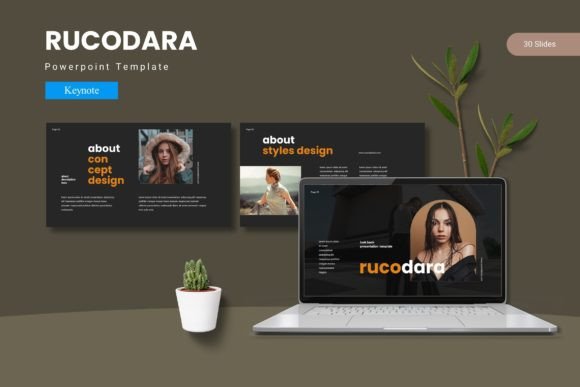
Rucodara Keynote Template: Build Polished Presentations Fast
If you have ever spent hours aligning text boxes, tweaking color palettes, or searching for the right icon to match your message, you know that presentation design can be a time sink. The Rucodara - Keynote Template aims to remove that friction. Built for Apple's Keynote, this template gives you a complete visual framework so you can focus on your content rather than starting from a blank slide. Whether you are pitching a product, teaching a class, or sharing a portfolio, Rucodara offers a structure that balances flexibility with a cohesive look.
What stands out immediately is the sheer volume of options. With 150 total slides spread across five premade color variations, you have a palette of possibilities without needing to redesign anything from scratch. Each color scheme includes 30 slides, so you can maintain consistency throughout a full-length presentation. There are also dedicated section break slides, which help you transition between topics smoothly. That might sound like a small detail, but in practice, a well-placed section break gives your audience a mental reset and keeps your narrative organized.
Designed for Real-World Flexibility
One of the first concerns people have with templates is that they look generic. Rucodara avoids that trap through a combination of handcrafted infographics, pixel-perfect illustrations, and master slides that let you swap content without breaking the layout. The infographics are especially useful if you present data often. Instead of fumbling with chart tools, you can drag in your numbers and let the built-in visuals do the heavy lifting. All graphics are resizable and editable, so you are never stuck with a shape or icon that does not fit your message.
The template also includes picture placeholders with a simple drag-and-drop workflow. This is a small convenience that saves time when you are working with multiple images. For instance, if you are putting together a portfolio or gallery slide, you can drop in your photos and the template will handle the alignment and spacing automatically. That kind of efficiency matters when you are on a deadline or juggling multiple projects.
What You Get in the Main File
The package is straightforward: five Keynote files, each with 30 slides and its own color scheme. Inside the folder you will also find a readme file, font information, and photo credits. The readme is brief but helpful—it tells you exactly how the master slides work and how to apply the color variations without losing your edits. If you are new to Keynote templates, that guidance removes the guesswork. For experienced users, it means you can start customizing immediately.
The color variations are worth calling out. Rather than offering subtle shifts, Rucodara provides five distinct moods. You might choose a bold, high-contrast scheme for a product launch or a muted, professional palette for a corporate boardroom. Having those options in separate files means you can test different looks without modifying your original content. If you present to multiple clients or departments, you can tailor the aesthetic to each audience while keeping the same slide structure.
Practical Applications Across Environments
This template is not limited to one type of user. In a business setting, the clean layouts and infographics work well for quarterly reports, strategy decks, and investor pitches. The section breaks allow you to separate financial data from market analysis, making the presentation easier to follow. For educators and trainers, the gallery slides and picture placeholders are ideal for case studies, student work, or visual examples. The ability to swap out images quickly means you can update your materials each semester without rebuilding the entire deck.
Freelancers and creative professionals will find the portfolio slides particularly useful. If you are a designer, photographer, or writer, you need a presentation that showcases your work without competing with it. Rucodara's layouts are clean enough to let your content take center stage, but polished enough to reflect your professionalism. You can also use the template for client proposals, where a consistent visual identity builds trust.
Entrepreneurs and marketers often need to move fast. A new product, a webinar, a sales presentation—you might have hours instead of days to prepare. With Rucodara, you can select a color scheme, drop in your text and images, and have a polished deck ready in a fraction of the time it would take to design from scratch. The master slides ensure that fonts, sizes, and spacing stay consistent across all slides, which is one less thing to worry about when you are under pressure.
Branding and Customization Without the Headache
If you have an existing brand identity, you might worry about fitting it into a template. Rucodara's design is flexible enough to accommodate custom colors, fonts, and logos. The master slides are built so that changes propagate automatically. Update the font on one master slide, and it applies to every slide that uses that layout. This is a huge time-saver compared to manually editing each slide. You can also adjust the color schemes to match your brand guidelines, even if that means deviating from the five included options.
Another practical consideration is file compatibility. Because the template is built natively in Keynote, you avoid the formatting issues that sometimes occur when converting from PowerPoint. Animations, transitions, and typography behave exactly as intended. If you collaborate with others who use Keynote, the template works seamlessly within your existing workflow. If you need to share with PowerPoint users, you can export without major layout shifts, though it is always worth testing a few slides to ensure fidelity.
Observations from Real Use
One thing that becomes apparent after using Rucodara is how much the section break slides improve the pacing of a longer presentation. When you are covering multiple topics in a single deck, the audience can experience fatigue. A well-designed break slide gives them a moment to reset and signals that you are moving to a new subject. This is a subtle technique, but it makes a noticeable difference in engagement.
The handcrafted infographics are another strong point. They feel less generic than the auto-generated charts you might find in presentation software. If you want to illustrate a process, compare metrics, or show a timeline, these visuals add a layer of polish that suggests attention to detail. Because they are editable, you can adjust colors and sizes to highlight the data that matters most.
A word of caution: with 150 slides, it can be tempting to use too many. A good practice is to plan your content first and then select the slides that support your narrative. The variety is a strength, but only if you apply it thoughtfully. Stick to one color variation per presentation, and use the section breaks sparingly to maintain impact.
Practical Considerations Before You Start
Before you dive in, make sure you have the fonts listed in the readme file. If you try to open the template without them, Keynote will substitute similar fonts, which can alter the intended design. The readme includes download links or font names, so this is easy to resolve. Also, take a few minutes to explore the master slides. Understanding how they work will save you time later when you need to make global edits.
If you are new to Keynote, do not worry. The drag-and-drop functionality makes it accessible, and the readme provides enough guidance to get you started. For advanced users, the template offers a solid foundation that you can push further with custom animations and transitions. The key is to treat it as a starting point, not a cage. Modify the layouts, swap illustrations, and adapt the structure to fit your specific needs.
Final Thoughts on Value and Usability
The Rucodara - Keynote Template delivers a practical balance of quantity and quality. With five complete color schemes and 150 slides, you have enough material to create multiple presentations without repeating layouts. The picture placeholders, editable graphics, and master slides streamline the production process, freeing you to focus on your message. Whether you are a seasoned presenter or someone who puts together decks occasionally, this template offers a reliable shortcut to professional-looking slides.
Where it shines most is in environments where time is limited but expectations are high. A startup founder preparing for investor meetings, a marketing manager pitching a campaign, a teacher building a curriculum module—each of these scenarios benefits from a tool that removes design overhead. The template does not replace your ideas, but it gives them a polished vehicle to travel in.
If you have been working with generic templates or building slides from scratch, Rucodara is worth a look. It is comprehensive without being bloated, customizable without being complex, and professional without feeling stiff. For anyone who communicates through presentations, that is a combination worth having in your toolkit.